
How to Create Polls in Discord: By Command and from the Dashboard
Create polls on Discord with /poll, from the dashboard or as a recurring template, and what native polls can do.
Updated: 14 October 2026
Discord has its own native polls. Kage's Polls module adds convenience: you create polls from the dashboard, have them posted on a schedule and retrieve results later. Discord itself handles the voting.
Quick answer: For a quick poll use /poll. For templates, role pings and history use the Polls module in the dashboard.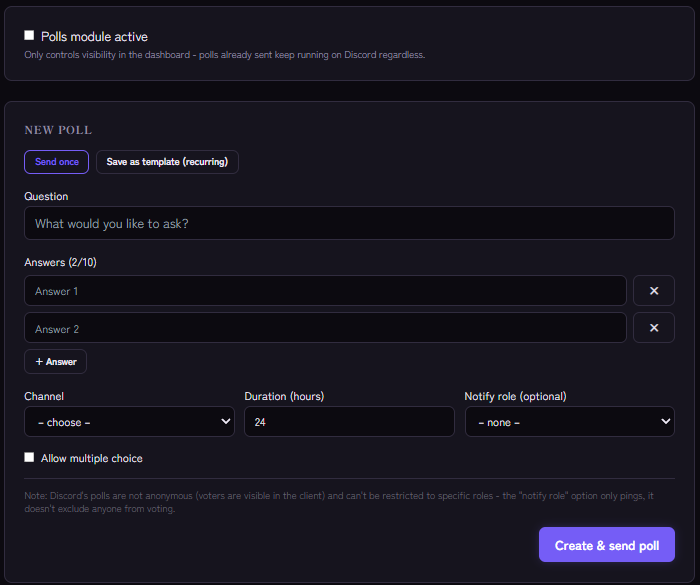
By command
/poll creates a poll in the current channel: with question, up to four answers (option1 to option4, two are required), optionally multiple for multiple choice and duration-hours (1 to 168, default 24).
From the dashboard
Under New poll you enter the question, answers (up to 10), runtime in hours and optionally a Notify role, and choose Allow multiple choice. With Create & send poll it appears in the channel. Runtimes of up to 32 days are possible.
Recurring templates
With Save as template (recurring) you set weekdays and a time at which Kage posts the same poll again automatically, for example every Monday at 18:00 for a feedback question. Templates can be triggered with Post now.
History and results
The dashboard stores the history and retrieves results on request (Results).
Limits of Discord polls
- Polls are not anonymous: voters are visible in the client.
- They cannot be restricted to roles. The Notify role option only pings, it does not exclude anyone.
For ideas and longer feedback a suggestion channel fits better.
Native poll or Kage?
If you just want a quick vote, Discord's native poll is enough. Kage is worth it when you need recurring polls, a history or creation from the dashboard.
If it does not work
- The poll does not appear. Check the bot's permissions in the channel.
- The module is disabled. That only controls visibility in the dashboard; polls already sent keep running on Discord.
Works well with
Polls and the starboard complement each other: a poll result shows what the majority wants, the starboard shows which posts land best.
FAQ
Are votes anonymous?
No, Discord shows who voted how.
Can I repeat polls automatically?
Yes, as a recurring template with weekday and time.
Related Kage features
- PollsIncluded in Basic
Related articles
More on this topic: How to Build an Active Discord Community
More questions? Ask Kage AIAI
Describe what you need – Kage AI picks out the right guide and gives you the sources.
Try Kage on your server
Sign in with Discord, invite the bot and set up the modules in the dashboard. The Basic plan is free forever.