
How to Read Discord Server Analytics
Read activity, growth and the community health score in the dashboard: what the numbers mean, where they come from and their limits.
Updated: 13 October 2026
Whether your server grows or just collects members only shows in numbers. The Analytics module shows activity, growth, the most active members and a community health score, and explains how it comes about.
Quick answer: In the dashboard open Analytics. At the top are key figures and the health score, below them history, period comparison, member growth, most active members and moderation. With Export CSV you take the daily values with you.
The sections
- Key figures: for example messages and warnings of the last seven days.
- Activity history: messages per day over the last weeks as a chart. At first it says "Not enough data yet", because the history only builds up over time.
- Period comparison: the current 30 days against the 30 days before.
- Member growth: joins and leaves of the last 30 days, net of the last 7 days, average messages per day, active members and voice activity.
- Most active members: the leaderboard by XP. It only fills if the leveling system is active.
- Moderation: number of warnings and the most common reasons.
- Raw data: the export of the daily values as CSV (date, messages, members, joins, leaves, active members, voice activity).
The community health score
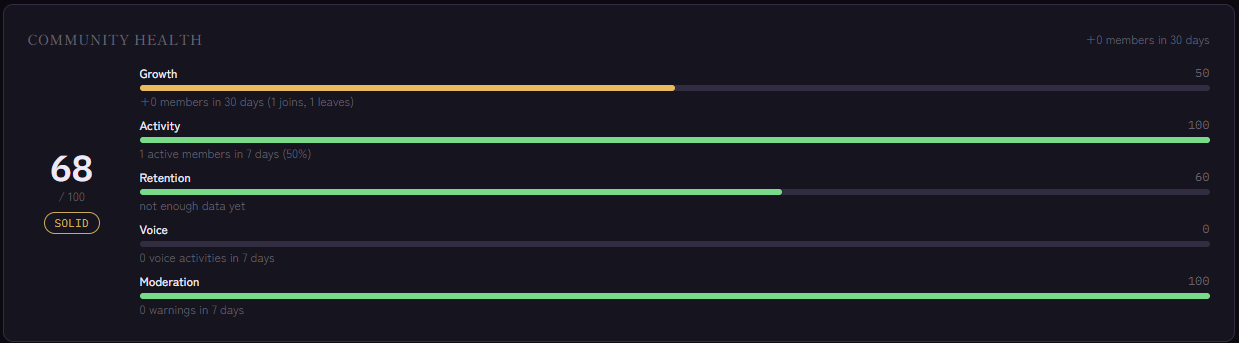
The score from 0 to 100 combines five factors. Each shows its reasoning right in the dashboard:
- Growth (25%): member change over the last 30 days relative to size.
- Activity (30%): share of members with at least one message in 7 days.
- Retention (25%): how many of those who joined 8 to 38 days ago are still there.
- Voice (10%): voice activity per member in 7 days.
- Moderation (10%): fewer warnings per 100 members give a better value.
The rating ranges from "Critical" through "Needs work" and "Solid" to "Good" and "Excellent". For orientation: growth of 0% gives 50 points, and for activity a quarter of active members is enough for the full score.
How to read the numbers
- The score is a guide, not a verdict. A small, close-knit server can be healthy with calm growth.
- Look at trends, not single values. The period comparison helps with that.
- Growth and retention belong together. Many joins with weak retention point to an entry problem. Onboarding is then the lever.
- The voice value uses the voice XP of the leveling system. If it is not switched on, the value stays low without voice activity necessarily being poor.
Where does the data come from?
- Messages and activity are counted by the bot continuously. The daily value is updated hourly.
- Joins and leaves come from Invite Tracking and only apply from the moment they were recorded. Before that it says "No join/leave data yet".
- There is no retroactive history. The evaluation becomes more meaningful every day.
If it does not work
- Only zeros or "Not enough data yet". Give the bot a few days. The history needs several daily values.
- The leaderboard is empty. Activate the leveling system.
- Retention says "not enough data yet". There are no joins from the 8 to 38 day window yet.
FAQ
Can I export the data?
Yes, with Export CSV you get the daily values as a file.
Does Analytics show individual channels?
No. The statistics apply to the whole server.
Can the health score be configured?
No, factors and weights are fixed so that the value stays comparable.
Related Kage features
- AnalyticsFrom Premium
Related articles
More on this topic: How to Grow a Discord Server: Win and Keep Members
More questions? Ask Kage AIAI
Describe what you need – Kage AI picks out the right guide and gives you the sources.
Try Kage on your server
Sign in with Discord, invite the bot and set up the modules in the dashboard. The Basic plan is free forever.