
How to Give Someone a Temporary Discord Role
Give Discord roles for a limited time only, by command or from the dashboard, with automatic removal on expiry and the main pitfalls.
Updated: 13 October 2026
A role for an event, a trial period as moderator or a time-limited VIP status: Discord has no roles with an expiry date. Anyone who needs this has to remember to remove the role, or a bot takes over. With Temporary Roles Kage assigns a role for a set duration and removes it again by itself afterwards.
Quick answer: Assign a role with a duration using/temprole grant(for example7d) or use the Temporary Roles module in the dashboard. Kage removes the role automatically once the time is up.
The command: /temprole
The command is meant for members with the "Manage Roles" permission:
/temprole grantgives a member a role for a duration. You enter the member, role, duration and optionally a reason./temprole listshows a member's active temporary roles with the time of expiry./temprole revokeremoves a temporary role right away.
You write the duration as a number with a unit:
30mfor 30 minutes2hfor 2 hours7dfor 7 days1wfor 1 week
Kage assigns the role immediately and confirms the expiry time.
In the dashboard
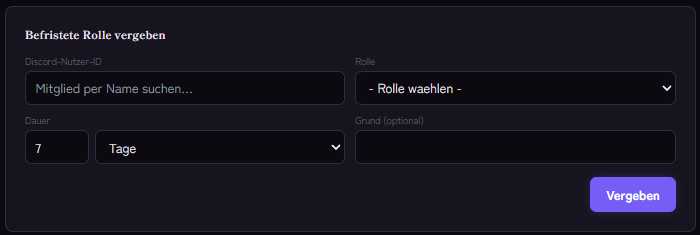
In the Kage dashboard open the Temporary Roles module. Under Grant a temporary role you enter the Discord user ID, the role, the duration and optionally a reason, then click Grant. The Active temporary roles table shows user, role, expiry and reason, and with Revoke you end a role early.
Temporary roles in Role Panels
Role Panels can also make roles temporary: if you enter temp. hrs for an option, every member who picks that option gets the role only for that many hours.
How removal works
In the background Kage checks every minute whether temporary roles have expired, and removes them then. That includes roles that expired while the bot was briefly down: they are removed on the next pass.
If you give the same member the same role again before the first period ends, the role stays until the end of the longer period.
Typical uses
- Event participants: a role for the event channel that expires after a day.
- Trial period: a moderator role for two weeks, after which the team decides.
- VIP campaign: perks for supporters for one month only.
If it does not work
- The role is not assigned. Check that the bot's role sits above the target role and that the bot may Manage Roles. The command reports missing permissions.
- The duration is not accepted. The format is a number directly followed by
m,h,dorw, such as12h. - The role is still there after expiry. Wait for the next minute-by-minute pass. If the role sits above the bot's own, Kage cannot remove it.
- The module is missing. Temporary Roles is tied to a plan. The "Related Kage features" box shows the current assignment.
You will find more causes in Discord bot not giving roles.
FAQ
What happens if the member leaves the server?
Discord removes a member's roles when they leave. Kage deletes the entry once the period has expired.
Can I extend a period?
Assign the role again with a new duration. The role then stays until the longest running period has expired.
Is there a way without a bot?
Discord itself has no time-limited roles. You would have to note the removal in a calendar yourself.
Related Kage features
- Temporary RolesFrom Premium
- Role PanelsFrom Premium
Related articles
More on this topic: Discord Roles Guide: How to Set Up and Manage Roles
More questions? Ask Kage AIAI
Describe what you need – Kage AI picks out the right guide and gives you the sources.
Try Kage on your server
Sign in with Discord, invite the bot and set up the modules in the dashboard. The Basic plan is free forever.