
How to Host a Giveaway in Discord: Requirements, Winners, Rerolls
Run fair giveaways in Discord: entry requirements, a winner role, rerolls and the settings that prevent abuse.
Updated: 14 October 2026
A giveaway brings members back to the server, but only if it is fair. With Giveaways you start a giveaway with a Join button, set requirements and let Kage draw the winners automatically.
Quick answer: In the dashboard under Giveaways click New giveaway (or use /giveaway create), enter prize, channel, runtime and number of winners, and set requirements and roles as needed. Ending and rerolling still work through commands.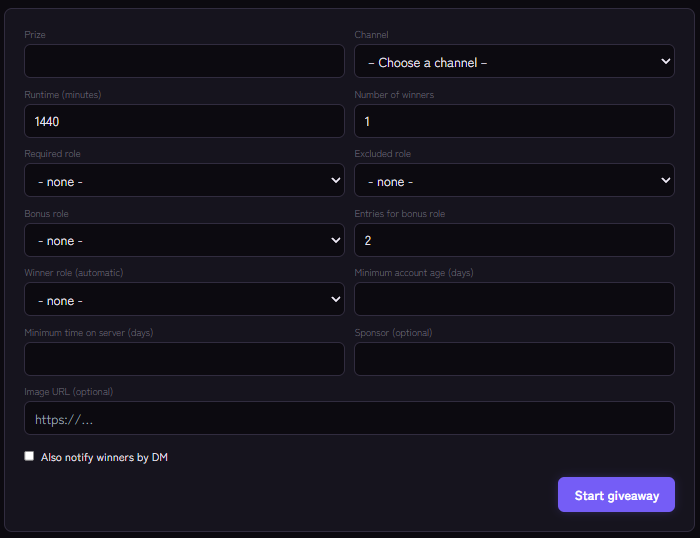
Starting a giveaway
In the dashboard click New giveaway and fill in the form:
- Prize, Channel, Runtime (minutes) and the Number of winners (up to 20).
- Required role: only members with this role may enter.
- Excluded role: members with this role may not enter.
- Bonus role and Entries for bonus role: members with the bonus role have more entries (default 2).
- Minimum account age (days) and Minimum time on server (days) protect against freshly created accounts.
- Winner role (automatic): winners receive this role.
- Also notify winners by DM, Sponsor and Image URL.
By command the same works with /giveaway create and the parameters prize, duration-minutes, winners, channel, required-role, bonus-role, bonus-entries, excluded-role, min-account-age-days, min-server-days, winner-role, notify-winner, sponsor and image-url. You need the "Manage Server" permission for that.
Members enter with the Join button on the message.
Ending, listing, rerolling
/giveaway listshows running giveaways with their ID./giveaway endends a giveaway right away and draws the winners./giveaway rerolldraws additional winners (1 to 20), for example if a winner does not respond. Previous winners are excluded.
In the dashboard you see Active and Completed with entrant counts, requirements and bonuses.
Fairness and abuse
- Minimum account age and time on server keep out throwaway accounts.
- An excluded role for team members prevents arguments about fairness.
- State the requirements in the text. Anyone who does not meet a requirement cannot enter.
- Giveaways with value are subject to legal rules. Check the legal situation in your country, especially for prizes with monetary value.
If it does not work
- Entering does not work. Check the member's role, minimum age and minimum time on the server.
- No winner role. The bot needs Manage Roles and must sit above the role, see Discord bot not giving roles.
- The limit is reached. The number of simultaneously running giveaways depends on your plan.
Works well with
If you run giveaways regularly, you can also reward members through the economy and use occasions like birthdays for a special event.
FAQ
Can I end a giveaway early?
Yes, with /giveaway end.
What if a winner does not answer?
With /giveaway reroll you draw new winners from the remaining entrants.
Related Kage features
- GiveawaysIncluded in Basic
Related articles
More on this topic: How to Build an Active Discord Community
More questions? Ask Kage AIAI
Describe what you need – Kage AI picks out the right guide and gives you the sources.
Try Kage on your server
Sign in with Discord, invite the bot and set up the modules in the dashboard. The Basic plan is free forever.