
How to Set Up Birthday Announcements in Discord
Congratulate members automatically: set up birthday announcements and an optional birthday role on Discord.
Updated: 14 October 2026
A personal greeting keeps members engaged. With the Birthdays module members enter their birthday themselves, and Kage congratulates them automatically on the day in a channel of your choice.
Quick answer: In the dashboard switch on Birthday announcements active, choose an Announcement channel and optionally a Birthday role. Members enter their date with /birthday set.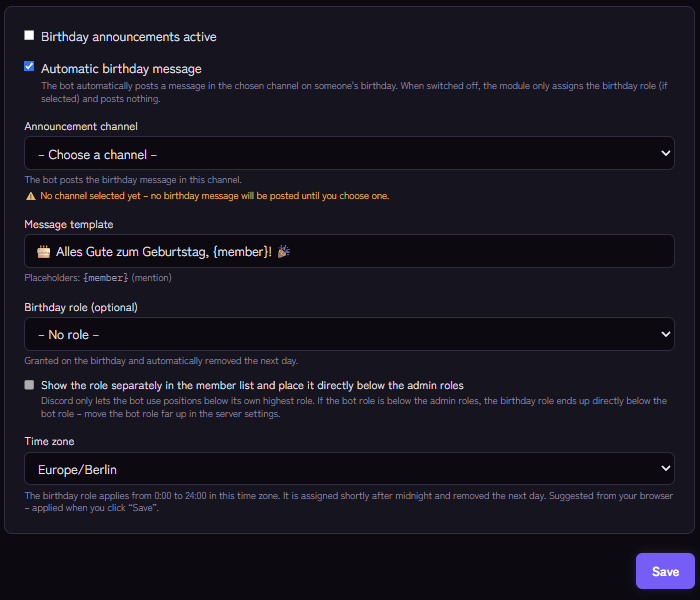
Setting it up
- Open the Birthdays module in the Kage dashboard and switch on Birthday announcements active.
- Choose the Announcement channel. As long as none is chosen, Kage posts no message.
- Write the Message template if you like. The placeholder
{member}mentions the birthday person. Default: "🎂 Happy birthday, {member}! 🎉" (the stored default text is German; set your own). - Optionally choose a Birthday role: it is given on the birthday and removed automatically the next day. With Show the role separately in the member list it is highlighted.
- Set the Time zone. The role applies from 0:00 to 24:00 in that time zone and is assigned shortly after midnight.
- Save.
With Automatic birthday message you switch the message off if the module should only assign the role.
Commands for members
/birthday setsaves the birthday (day and month, no year)./birthday showshows a member's birthday./birthday removedeletes your own entry./birthday upcominglists the server's next birthdays.
In the dashboard you see who is next under Upcoming birthdays.
Privacy
Only day and month are stored, no birth year, and each member decides themselves whether to create an entry. Mention it in your rules and explain how to delete the entry with /birthday remove.
If it does not work
- No message appears. Is a channel chosen, Automatic birthday message on and may the bot write there?
- The role is not assigned. Check the role order and Manage Roles. If the bot's role sits below the admin roles, the birthday role ends up directly below the bot's role; move the bot's role far up.
- Wrong day. Check the time zone.
Works well with
Birthdays are a good reason for small community moments: run a giveaway for everyone, or collect the nicest wishes on the starboard.
FAQ
Is it posted twice on the same day?
No, Kage posts only once per birthday and day.
Can I enter birthdays for others?
Each member enters their own birthday.
Related Kage features
- BirthdaysIncluded in Basic
Related articles
More on this topic: How to Build an Active Discord Community
More questions? Ask Kage AIAI
Describe what you need – Kage AI picks out the right guide and gives you the sources.
Try Kage on your server
Sign in with Discord, invite the bot and set up the modules in the dashboard. The Basic plan is free forever.