
How to Set Up a Discord Economy System with a Shop
Set up your own server currency on Discord with a daily reward, working, transfers and a role shop.
Updated: 13 October 2026
A currency of your own gives members a goal: they collect a little every day, trade with each other and buy roles in the shop. The Economy module brings the currency, rewards and a role shop.
Quick answer: In the dashboard open Economy, switch on Economy active, name the currency, set the daily and work amounts and create roles for the shop with + New item. Members use/economy daily,/economy workand/economy shop.
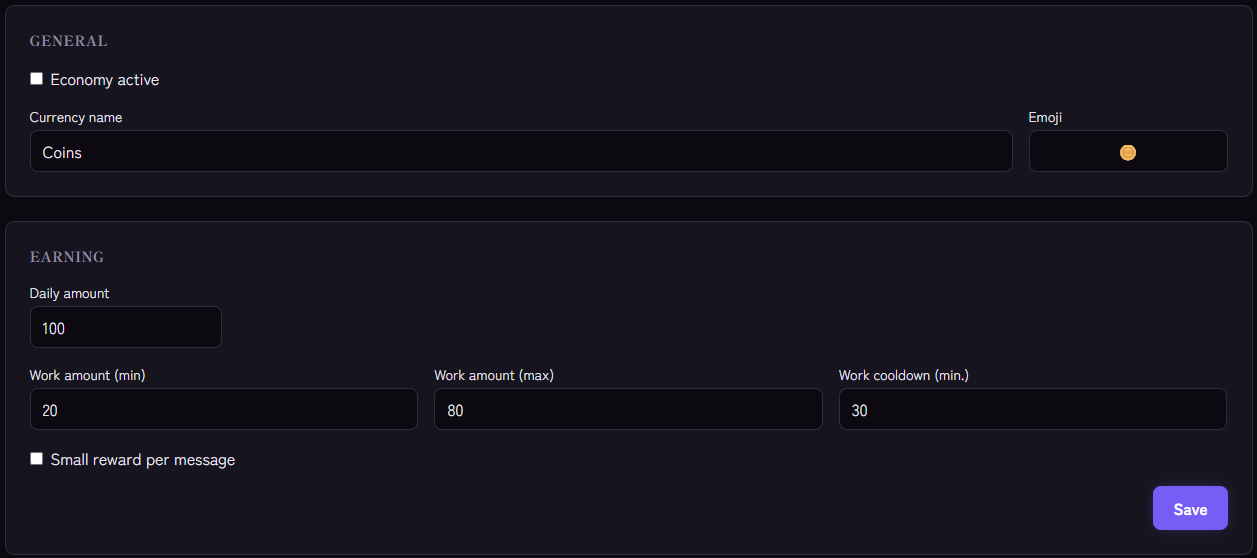
Setting it up
- Open the Economy module and switch on Economy active.
- Enter the currency name, for example "Coins" or "Stars", and choose an emoji if you like.
- Under Earning set:
- Daily amount: can be claimed once every 24 hours (default 100).
- Work amount (min) and (max): a random value in this range (default 20 to 80).
- Work cooldown (min.): waiting time between two jobs (default 30).
- Small reward per message: optional, with Amount per message (default 1) and Cooldown (sec.) (default 60). Off by default.
- Build the shop: click + New item and enter the name, price and the role on purchase.
- Save.
Commands for members
/economy balanceshows your own balance (or someone else's), visible only to you./economy dailyclaims the daily reward. The window is a rolling 24 hours from the last claim, not until midnight./economy workbrings a random amount and has a cooldown./economy paytransfers balance to another member (not to yourself and not to bots)./economy leaderboardshows the ten richest members,/economy historythe last ten bookings./economy shoplists the items,/economy buybuys an item by its number.
Commands for admins
Members with "Manage Server" use:
/economy admin-giveto credit or deduct (negative amount) for a member,/economy shop-createand/economy shop-deletefor shop items.
How the shop works
An item is a role with a price. On purchase Kage deducts the amount and assigns the role. If the member already has the role, the purchase is rejected. If the role cannot be assigned, the member gets the balance back. The bot needs "Manage Roles" for this, and the role must sit below the bot's role. See also Bot not assigning roles.
Finding balance
- Think of prices in days. If a role is worth seven to fourteen daily rewards, it stays a goal without being out of reach.
- Use message earnings with care. They only know a cooldown, no minimum length. If you want currency for activity, combine it with anti-spam or prefer XP.
- Admin credits sparingly. They show in the history as an admin booking.
- No gambling. Kage deliberately offers no betting commands.
If it does not work
- "Economy is not active". Switch the module on in the dashboard.
- A purchase is refunded. The role cannot be assigned. Check permissions and role order.
- The role of an item was deleted. Create the item again.
/economy dailydoes not work yet. Fewer than 24 hours have passed since the last claim. Kage tells you the next time.
FAQ
Does the currency have real value?
No. It exists only on your server.
Is the balance valid across servers?
No, each server has its own balances.
What is the difference to XP?
XP measure activity and unlock levels. The currency is spent and can go down. More in the overview: Economy and rewards. How the two work together is covered in Combining XP and economy.
Related Kage features
- EconomyFrom Premium
Related articles
More on this topic: Discord Economy and Rewards: Motivation for Your Community
More questions? Ask Kage AIAI
Describe what you need – Kage AI picks out the right guide and gives you the sources.
Try Kage on your server
Sign in with Discord, invite the bot and set up the modules in the dashboard. The Basic plan is free forever.