
How to Make Anonymous Confessions in Discord
Anonymous posts on Discord: how confessions work, how anonymous they really are and how to moderate them.
Updated: 13 October 2026
Some things people do not say under their real name. With the Confessions module members post anonymous, numbered messages into a channel. That lowers the barrier but demands honest rules and active moderation.
Quick answer: Switch on /confess active (the command is /confession) and choose the Confessions channel. The author is shown to nobody in Discord, not even admins. You can act on abuse through the confession log with "Ban author" without learning who it was.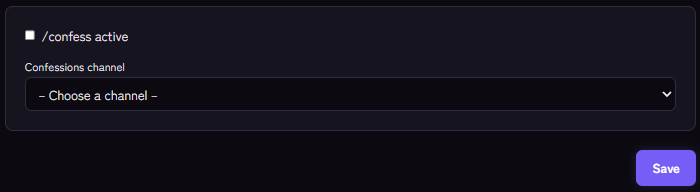
Setting it up
- Create a channel, for example
#confessions, and give the bot write permission there. - Open the Confessions module and switch it on.
- Choose the Confessions channel and save.
Members use the /confession command with their text. Kage posts it as a card with a sequential number and confirms the number to the member, visible only to them.
How anonymous is it really?
- In Discord: the author is invisible to everyone, including moderators and admins.
- In the dashboard: the confession log shows all confessions but never the author.
- Technically: Kage stores the author's ID internally so abuse can be acted on. It is not shown in the dashboard. State in your rules that the service can attribute abuse, and describe this honestly.
Moderating abuse
In the dashboard's confession log every confession has Ban author. After confirmation the author is banned permanently without you learning who it is. You can optionally give a reason that appears in Discord's server audit log.
Further safeguards:
- Rules for the channel: no names, no insults, no personal data of third parties.
- The word filter does not intervene automatically in these confessions because the bot posts them; check the channel regularly. See Word Filter.
- Agree within the team: decide who may trigger bans and keep them traceable in the team. General moderation logs: Setting up a mod log.
If it does not work
- "Not set up": the module is not active or the channel is missing.
- The confession does not appear. Check the bot's write permission in the channel.
- Ban author fails. The bot needs Ban Members and must sit above the author's role.
FAQ
Can I find out an author?
Not through the dashboard. You can only ban them.
Is this suitable for every server?
Only if you can moderate it. Without oversight anonymous channels quickly become a problem.
Related Kage features
- ConfessionsIncluded in Basic
- ModerationIncluded in Basic
Related articles
More on this topic: How to Build an Active Discord Community
More questions? Ask Kage AIAI
Describe what you need – Kage AI picks out the right guide and gives you the sources.
Try Kage on your server
Sign in with Discord, invite the bot and set up the modules in the dashboard. The Basic plan is free forever.