
How to Block Certain Words in Discord with the Word Filter
Block swear words, advertising and invite links on your Discord server with the Kage Word Filter, including the pitfalls of partial-word matching.
Updated: 13 October 2026
Swear words, advertising, scams, or simply terms that have no place in your community: with the Word Filter Kage deletes messages automatically as soon as they contain a banned term.
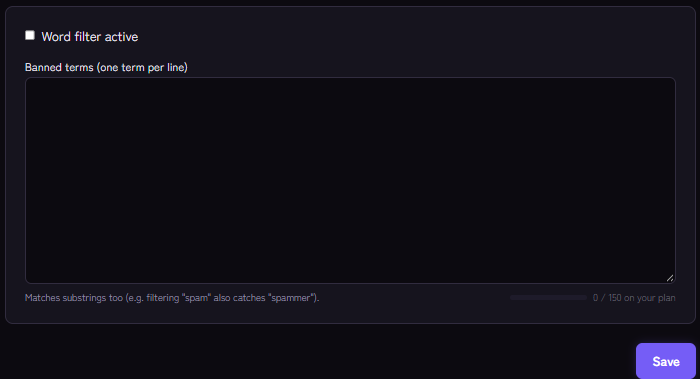
Quick answer: In the dashboard under Word Filter enter one term per line, switch the filter on and save. Kage deletes every new message containing one of those terms and also catches partial words. Members with "Manage Messages" are exempt.
What Discord offers natively
Discord includes AutoMod, its own keyword filter that supports wildcards and can alert moderators about matches. If that is enough for you, you do not need a bot for this. Kage's Word Filter is the simple alternative: one list of terms that applies across the server, combined with Kage's mod log.
Setting up the Word Filter
- Open the Word Filter module in the Kage dashboard.
- Switch on Word filter active.
- Under Banned terms (one term per line) enter your terms, one per line.
- Save.
From now on Kage checks every new message. If it contains a term from the list, this happens:
- The message is deleted.
- A short notice for the member appears in the channel and disappears again after a few seconds.
- The hit is reported in the mod log if a log channel is set up there (Setting up a mod log channel). The matched term is shown behind a spoiler.
The bot needs the Manage Messages permission in the channel for this.
How matching works, and where it misleads
The Word Filter looks for each term as part of a text and does not distinguish upper from lower case. The dashboard gives this example: if you filter "spam", that also catches "spammer".
That leads to rules for good lists:
- Short terms are risky. A short term often sits inside harmless words. Choose longer, unambiguous terms or whole phrases.
- Blocking invite links. An entry like
discord.gg/deletes messages with server invites. It also catches legitimate invites to your own server, which moderators can still post. - Test with a normal account. Moderators are never filtered, so with your own admin account you will see no effect.
Limits of the Word Filter
So you do not rely on more than it does:
- It works from a fixed list. It understands neither meaning nor context and has no wildcards or patterns.
- Terms disguised with digits, spaces or special characters are not recognised.
- It checks newly sent and later edited messages. Whoever posts something harmless first and changes the text afterwards is checked again on editing, as long as the bot still has the message in its cache, so mainly recently sent messages. A mere link preview, where the text does not change, does not trigger a new check.
- It only deletes. The filter does not hand out warnings or penalties by itself; use the warning system for that.
- The number of terms is limited by your plan. The dashboard shows your limit.
If it does not work
- Nothing is deleted. Is Word filter active switched on? Is the term in the list without typos? Is the person testing not a moderator? Does the bot have Manage Messages in the channel?
- Too much is deleted. A term sits inside harmless words. Replace it with a longer form.
- No entry in the mod log. The log must be set up in the Moderation module with a log channel. The Word Filter uses the same channel as the moderation commands.
FAQ
Do I need to care about upper and lower case?
No, matching ignores it.
Can I exclude single channels or roles?
There is one exemption: members with "Manage Messages" are never filtered. There are no further channel or role exceptions.
Is there a ready-made list of terms?
No, you maintain the list yourself, so it stays tailored to your community.
Related Kage features
- Word FilterIncluded in Basic
- ModerationIncluded in Basic
- Anti-SpamIncluded in Basic
Related articles
More on this topic: Discord Moderation Guide: How to Keep Your Server Safe
More questions? Ask Kage AIAI
Describe what you need – Kage AI picks out the right guide and gives you the sources.
Try Kage on your server
Sign in with Discord, invite the bot and set up the modules in the dashboard. The Basic plan is free forever.