
How to Set Up Level Roles in Discord: Rank Roles and Level Rewards
Assign roles automatically at a level or rank: the difference between rank roles and level rewards and typical mistakes.
Updated: 20 October 2026
"Whoever reaches level 10 gets the Active Member role." The Levels & XP module has two different ways to do this, and they differ in one important point: rank roles replace each other, level rewards stack.
Quick answer: For a few clearly named tiers use the ranks (they replace the previous role). For rewards at particular levels use level rewards (they stay in addition). The bot needs Manage Roles and must sit above these roles in the role list.
Rank roles
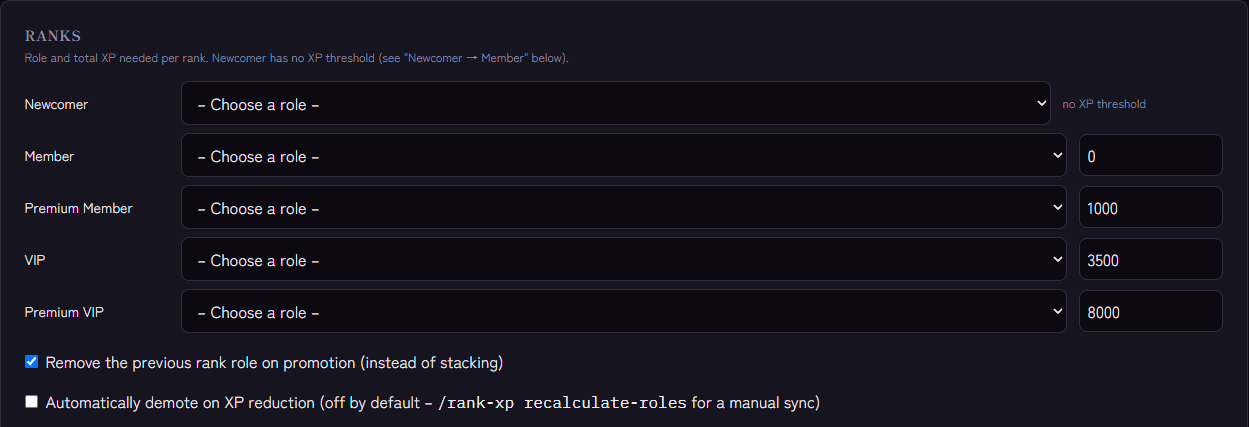
There are five named ranks: Newcomer, Member, Premium Member, VIP and Premium VIP. In the Ranks section you choose a role per rank. Each rank has a threshold of total XP (default: 0, 1000, 3500, 8000; Newcomer has none because it is left through conditions).
- On promotion Kage swaps the rank role. If Remove the previous rank role on promotion (instead of stacking) is on (default), the member keeps only the new one.
- If an admin removes XP, Kage only demotes if Automatically demote on XP reduction is on (default: off). With
/rank-xp recalculate-rolesyou reconcile a member's role with their XP manually. - You set the role and required total XP per rank in the dashboard.
Level rewards
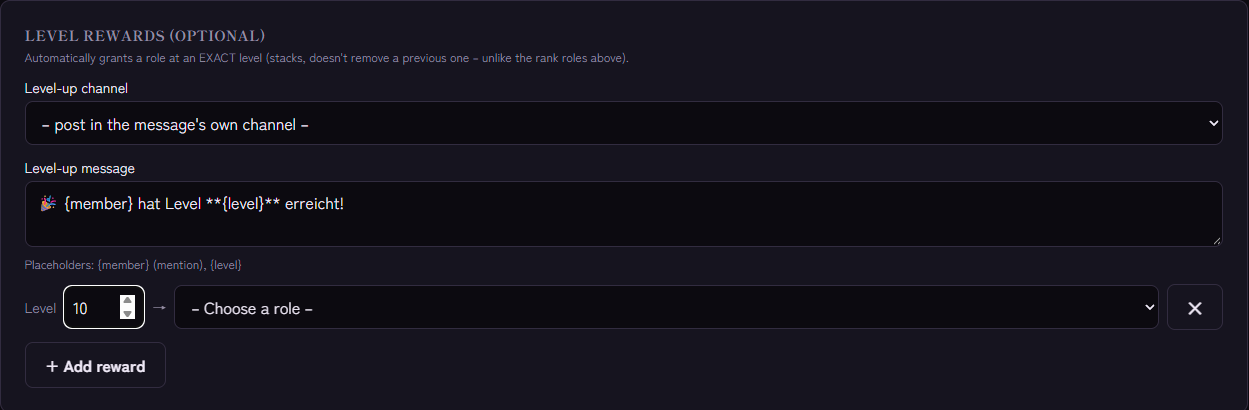
Under Level rewards (optional) you create rows with Level and Role. When a member reaches that level or skips past it (for example through bonus XP) they get the role. It stacks: a previously earned level role is not removed. Anyone who had passed the threshold earlier gets the role once automatically afterwards. Each level can have only one reward.
Which variant for what?
- Ranks: a few clearly distinguishable tiers ("Newcomer → Regular → Veteran") where only the highest role should apply.
- Level rewards: milestones ("level 10: choose a colour", "level 25: own channel") that should remain.
You can combine both.
Setup step by step
- Create the roles in Discord and place the bot's role above them.
- Open Levels & XP and choose the roles under Ranks.
- Under Level rewards enter level and role; + Add reward for more.
- Save.
Tips
- No permission roles as rewards. Automatic roles should only bring cosmetics or harmless access.
- Start with a few rewards. Too many tiers devalue each one.
- Combine with self-selection. If you also want freely selectable roles, use Role Panels; level requirements can be set per option there.
If it does not work
- The role does not arrive. Check role order and Manage Roles, see Discord bot not giving roles. Also check that the role still exists in the dashboard: deleted roles are flagged with a warning in the form.
- The level was skipped. That's not a problem: the reward applies from the configured level on, even if someone jumps from level 9 to 11 through bonus XP. If you just added the reward, Kage catches it up once within a few minutes for everyone who had already reached the value.
- The rank role is missing after an XP removal. Auto-demotion is off by default; reconcile with
/rank-xp recalculate-roles.
For role assignment in general: How to automatically assign roles in Discord.
FAQ
Can a member have several level roles at once?
Yes, level rewards stack. Rank roles do too, but only if you switch off removing the previous role.
Does it work retroactively for existing members?
The role is assigned when the level is reached. For existing members you reconcile ranks with /rank-xp recalculate-roles.
Related Kage features
- Levels & XPFrom Premium
- Auto-RolesIncluded in Basic
Related articles
More on this topic: Discord Leveling System: XP, Ranks and Rewards
More questions? Ask Kage AIAI
Describe what you need – Kage AI picks out the right guide and gives you the sources.
Try Kage on your server
Sign in with Discord, invite the bot and set up the modules in the dashboard. The Basic plan is free forever.