
How to Add a Leveling System to Discord
Add XP and levels to your Discord server: how XP is earned, how to prevent farming and how to set up level-up messages.
Updated: 13 October 2026
Members should be rewarded for activity without anyone winning by spamming. The Levels & XP module (called the rank/XP system in the dashboard) awards XP for messages, reactions and voice time, converts it into levels and ranks and slows abuse with cooldowns and daily caps.
Quick answer: Open the Levels & XP module, switch on Rank/XP system active and start with the defaults. Only decide where level-up messages should go. Fine-tune later once you see how the chat behaves.
How XP works
The defaults (all adjustable in the dashboard):
- Messages: 5 XP per message, at most every 60 seconds, from 5 characters in length, up to 300 XP per day.
- Reactions: 1 XP, 60 second cooldown, up to 100 XP per day. Reactions on your own messages and on bot messages do not count.
- Voice: 1 XP every 3 minutes, at least 2 real people in the channel (bots do not count), up to 200 XP per day. Not in the AFK channel and not while self-muted.
- Daily bonus: 10 XP once a day on first activity, optionally with a growing streak bonus.
- Events and boosts: admins grant event XP by command; new server boosts can give XP (with a cooldown against boost farming).
Bots never get XP. Anyone holding a role from the Role exclusion list earns no XP from messages, reactions or voice.
Levels and ranks
Total XP produces two independent progressions:
- Level: total XP for level n = base × n². With the default base of 100, level 1 is reached at 100 XP, level 2 at 400, level 3 at 900. You can change the base and individual thresholds.
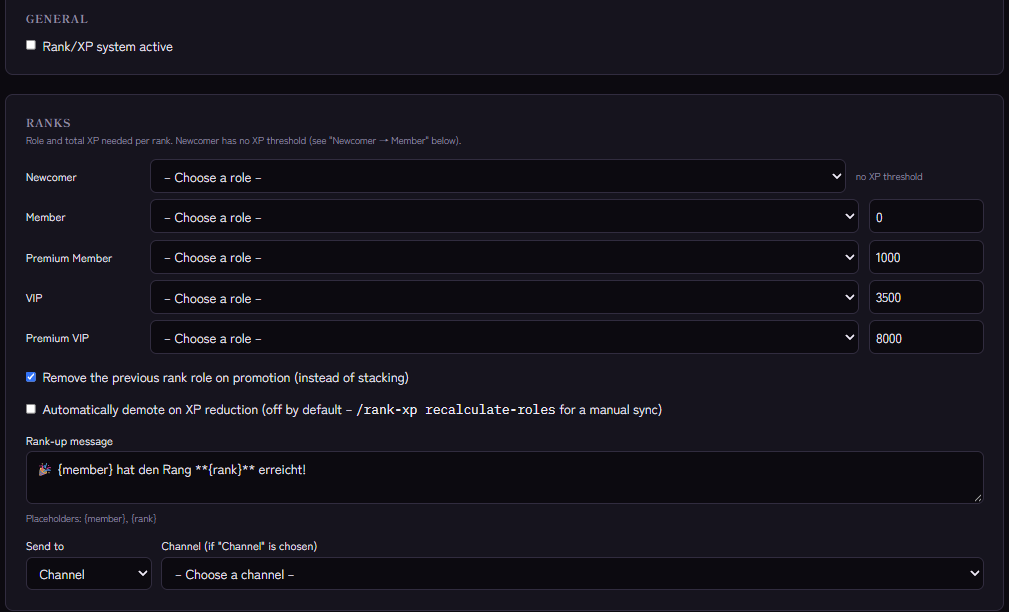
- Ranks: five named tiers: Newcomer, Member, Premium Member (from 1000 XP), VIP (from 3500 XP) and Premium VIP (from 8000 XP). Linked to roles, the role changes on promotion.
How to link roles is explained in How to set up level roles in Discord.
Level-up messages
Under Level-up channel you choose the channel in which level-ups appear. Without a chosen channel Kage sends no level-up message (the dropdown does offer "post in the message's own channel", but in practice no message is sent then). The Level-up message supports the placeholders {member} (mention) and {level}. Rank promotions have their own Rank-up message with {member} and {rank}; it can be sent to a channel, by direct message or not at all.
Newcomer promotion
New members start as Newcomer. Once all enabled conditions are met (by default one message and one reaction), Kage swaps the Newcomer role for the Member role, once and permanently.
Good practice
- Start with the defaults and after two weeks check how many members reach which ranks.
- Use channel overrides to exclude channels from XP (for example a spam or bot channel) or to reward a channel with a fixed amount.
- Use multipliers sparingly: role multipliers (the highest matching role wins) and time windows such as a weekend bonus (times in UTC) reward selectively but distort the balance when set too high.
- Restart with a season reset: a season reset sets all XP to 0, keeps the history, and lets you save the leaderboard as CSV first. It is limited to server admins.
Progress for members
Members see their standing with /level, the top 10 with /leaderboard and an explanation with /level-info. Admins control XP with /rank-xp add, remove, event, reset, history and recalculate-roles.
If it does not work
- No XP. Is Rank/XP system active on? Is the message long enough, the cooldown over, the daily cap not reached and the channel not excluded?
- A role is not assigned. Check the role order and the Manage Roles permission, see Discord bot not giving roles.
- The module pauses. Levels & XP is tied to a plan; the "Related Kage features" box shows the current assignment.
FAQ
How do I stop someone farming XP with spam?
With the cooldown, minimum length and daily cap. Anti-Spam additionally helps against message floods.
Can I grant or remove XP?
Yes, with /rank-xp add and /rank-xp remove. Every change appears in the XP history.
Related Kage features
- Levels & XPFrom Premium
Related articles
More on this topic: Discord Leveling System: XP, Ranks and Rewards
More questions? Ask Kage AIAI
Describe what you need – Kage AI picks out the right guide and gives you the sources.
Try Kage on your server
Sign in with Discord, invite the bot and set up the modules in the dashboard. The Basic plan is free forever.