
How to Stop Spam in a Discord Server Automatically
Stop message floods in your Discord server automatically with anti-spam limits and an optional timeout, plus when slowmode or another module is the better fit.
Updated: 13 October 2026
Someone posts ten messages in a few seconds and the chat becomes unusable. The Anti-Spam module limits how many messages a member can send in a time window. Everything above the limit is deleted automatically, and you can add a short timeout on top.
Quick answer: Turn on Anti-Spam in the dashboard, set how many messages are allowed in how many seconds (for example 5 in 5 seconds) and decide whether there should be a timeout. Members with "Manage Messages" are exempt.
What kind of spam Anti-Spam catches
The module only measures the amount and speed of messages. It does not read their content. That has pros and cons:
- It reliably catches message floods no matter what the messages say.
- It does not catch ad links, invites or particular words as long as they arrive at a normal pace. That is a job for the Word Filter.
- It does not catch spam accounts at the moment they join. That is a job for Anti-Raid.
What Discord offers natively
In Discord you can set a slowmode per channel, which allows each member only one message every few seconds. It suits individual, busy channels. Discord also includes spam detection in AutoMod. Kage's Anti-Spam is the alternative when you want to choose the limits yourself and see hits in your server's mod log.
Setting up Anti-Spam with Kage
- Open the Anti-Spam module in the Kage dashboard.
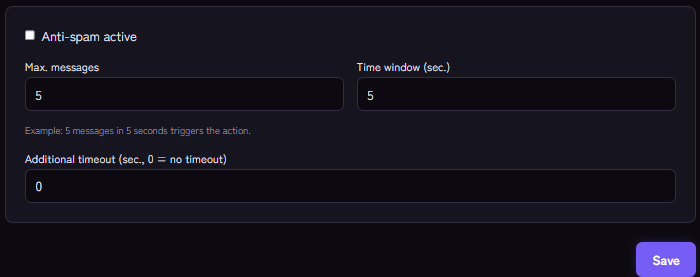
- Switch on Anti-spam active.
- Set the limit with Max. messages and Time window (sec.). The example in the dashboard is 5 messages in 5 seconds. The action kicks in as soon as someone sends more than that number within the window.
- Under Additional timeout (sec., 0 = no timeout) decide whether a timeout should come on top of the deletion. At 0, messages are only deleted.
- Save.
To test it you need a normal account without the "Manage Messages" permission, because moderators are exempt from Anti-Spam.
What happens next
- The excess message is deleted.
- For at least 30 seconds after that, Kage silently deletes further messages from that person so they cannot just keep typing. If a timeout is set, the lock phase lasts at least as long as the timeout.
- If a timeout above 0 is set, Discord also times the member out.
- The hit appears in your mod log if you have one set up: Setting up a mod log channel.
Which permissions the bot needs
The bot must be allowed to delete messages in the affected channels (Manage Messages). For the timeout it needs Timeout Members, and its role must sit above the member's highest role in the role list. Discord cannot time out members who have the Administrator permission.
Example settings
- Normal community chat: 5 messages in 5 seconds, no timeout. This removes floods without bothering quiet members.
- Fast gaming chats: a bit higher, for example 8 messages in 5 seconds, so lively conversations are not hit.
- Strict server with a lot of spam: 4 messages in 5 seconds with a 60 second timeout.
These are starting points to try, not fixed recommendations. Watch for a few days after switching it on and adjust if real members are hit.
If it does not work
- Nothing is deleted. Check that Anti-spam active is on, that your test account really sends more messages than allowed ("more than" means: with 5 allowed, it triggers on the sixth) and that the bot has Manage Messages in that channel. Channel permissions can override server permissions.
- There is no timeout. Check the timeout field (0 means none), the Timeout Members permission and the role order.
- Real members get hit. Raise the count or the window. Anti-Spam has no channel or role exceptions, only the exemption for members with "Manage Messages".
- The hit does not show in the log. The mod log must be switched on in the Moderation module and have a channel.
FAQ
Does Anti-Spam detect links or invites?
No, it only counts messages per time. To block invite links you can add discord.gg/ as a term in the Word Filter.
Does the bot need access to message content?
Not for Anti-Spam. It only works with the time between messages.
Can I exclude single channels?
Not at the moment. If a channel is meant to be fast, choose limits with more room.
How do I handle repeat offenders?
Anti-Spam deletes and stops. For consequences, warn members with the warning system and let Kage act automatically at a certain number of warnings.
Related Kage features
- Anti-SpamIncluded in Basic
- ModerationIncluded in Basic
- Anti-RaidIncluded in Basic
- Word FilterIncluded in Basic
Related articles
More on this topic: Discord Moderation Guide: How to Keep Your Server Safe
More questions? Ask Kage AIAI
Describe what you need – Kage AI picks out the right guide and gives you the sources.
Try Kage on your server
Sign in with Discord, invite the bot and set up the modules in the dashboard. The Basic plan is free forever.