
How to Post Bluesky Posts to Discord
Post new posts of a Bluesky account to a Discord channel automatically: enter the handle, choose a channel, adjust the template.
Updated: 14 October 2026
You or someone from your community posts on Bluesky, and you want those posts to show up in Discord as well? The Bluesky entry of Social Alerts announces new posts of an account automatically.
Quick answer: In the dashboard under Social Alerts open Bluesky, enter the Bluesky handle (for example name.bsky.social) or the profile link, choose a channel and click Add.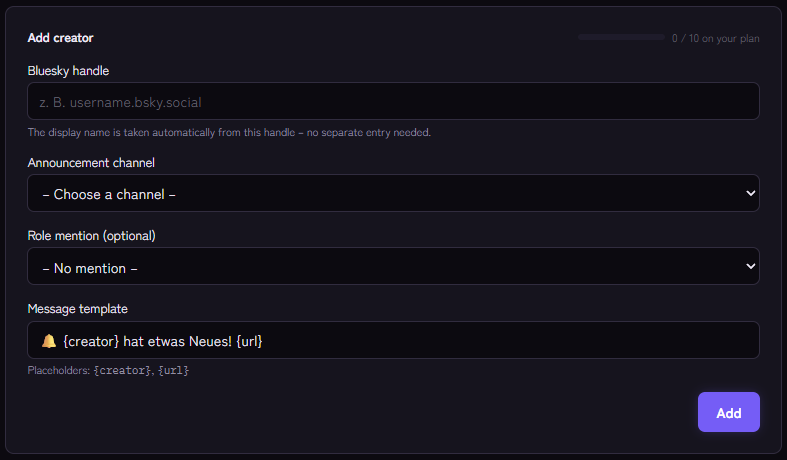
Setting it up
- Open Social Alerts › Bluesky and use the Add creator form.
- Enter the Bluesky handle, with or without a leading @, or the link to the profile on
bsky.app. The display name is taken from it. - Choose the channel where it is announced.
- Optional: a role that is pinged with every announcement (otherwise No mention).
- Adjust the message template. Available are
{creator},{title}(the post text, shortened to 280 characters),{url}and{platform}. - Click Add.
Example template: 🦋 {creator} on Bluesky: {title} {url}
You need neither a Bluesky account for Kage nor an API key. Only public posts are read.
What gets announced
- New posts of the account's own.
- Not announced are replies to other posts and reposts. An account that only reposts triggers no message.
How the announcement behaves
- Kage checks about every five minutes.
- On the first check after adding, the current newest post is only remembered, not announced.
- Kage looks at the newest post each time. If several appear between two checks, only the newest is announced.
If it does not work
- Nothing arrives. Is the handle correct? Has the account published a new post of its own after adding (no reply, no repost)? An administrator can have all entries checked immediately with
/social test. - The bot does not post. Check the permissions in the target channel. Monitoring reports missing permissions.
- The limit is reached. The number of entries per platform depends on the plan.
Works well with
Other sources can be connected the same way, for example Reddit or any RSS feed or podcast. The page on social integrations gives an overview of all of them.
FAQ
Does the person have to be on my server?
No, only public posts are read.
Are images posted too?
Kage posts the text and the link to the post. Discord usually shows a preview of the link itself.
Related Kage features
- BlueskyFrom Premium
Related articles
More on this topic: Connect Social Media to Discord: Announce New Content
More questions? Ask Kage AIAI
Describe what you need – Kage AI picks out the right guide and gives you the sources.
Try Kage on your server
Sign in with Discord, invite the bot and set up the modules in the dashboard. The Basic plan is free forever.