
How to Reward Discord Invites with Roles or XP
Reward members with roles or XP when they bring real invites, with thresholds and protection against fake accounts.
Updated: 13 October 2026
Whoever brings new members should get something out of it. With the Referral System you grant a role or XP as soon as someone reaches a number of real invites. It builds on Invite Tracking.
Quick answer: In the dashboard open Referral System, switch it on, set the minimum account age and add thresholds with a role or XP using + Add reward. Alternatively:/referral add-roleand/referral add-xp.
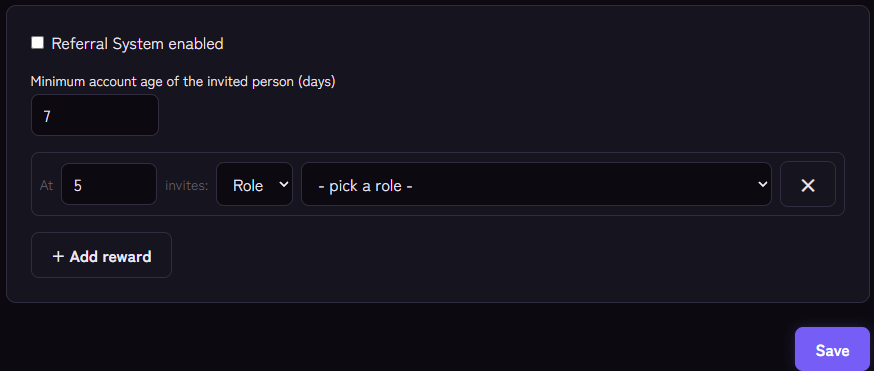
Setting it up
- Open the Referral System module and switch on Referral System enabled.
- Set the minimum account age of the invited person in days (default 7).
- Click + Add reward. The row reads "At … invites:". Choose Role or XP and the matching role or XP amount.
- Save.
With commands (for members with "Manage Server"):
/referral add-role threshold:5 role:@Promotergrants the role at 5 real invites./referral add-xp threshold:10 xp:500grants 500 XP at 10 real invites./referral listshows all rewards,/referral removeremoves a threshold,/referral settingssets the minimum account age (0 to 365 days).
Up to 25 rewards are possible. There is exactly one per threshold; if you set something again for the same threshold, it replaces the old reward.
What counts as a "real invite"
Counted are members who joined through the person, are not considered fake (account younger than the minimum account age, or a re-join) and are still on the server. This is the same net value as in /invites.
When is a reward given?
- The check happens when a new, non-fake member joins through the person.
- If that brings the person to a threshold, they get the reward once. Each threshold is granted only once per person.
- If the value later drops again because invitees leave, the role is not removed.
- XP rewards go through the leveling system with the source "Event". For roles, the role must sit below the bot's role, otherwise it cannot be assigned.
Tips
- Spaced thresholds: for example 3, 10, 25 instead of 1, 2, 3. That rewards genuine engagement.
- Do not set the minimum account age too low. Fresh throwaway accounts are the most common trick. Seven days is a sensible start.
- A visible role as the goal: a promoter role with its own colour motivates. See also level roles.
- Write it into your rules. Say openly that fake invites do not count.
If it does not work
- The role is not assigned. Is it above the bot's role? Does the bot have "Manage Roles"? Monitoring reports that.
- The reward does not arrive although there are enough invites. Do the invites count as real? Check
/invites. A reward is only given at the next real join through the person. - The person already got the reward once. Each threshold applies to a person only once.
FAQ
Can the Referral System be gamed?
It cannot be ruled out entirely. Account age, re-join detection and the net value (people who left do not count) make it much harder, though.
Do I need Invite Tracking separately?
Recording runs automatically. The Referral System uses the same data.
Related Kage features
- Referral SystemFrom Premium
- Invite TrackingFrom Premium
Related articles
More on this topic: How to Grow a Discord Server: Win and Keep Members
More questions? Ask Kage AIAI
Describe what you need – Kage AI picks out the right guide and gives you the sources.
Try Kage on your server
Sign in with Discord, invite the bot and set up the modules in the dashboard. The Basic plan is free forever.