
How to Log Deleted and Edited Messages in Discord
Log deleted and edited messages as well as nickname and role changes in a Discord log channel, including the real limits of the log.
Updated: 14 October 2026
"Who wrote that, and why is it gone?" Without a log such questions stay open. The Audit Log module writes deleted and edited messages, plus changes to nicknames and roles, into a channel of your choice.
Quick answer: Create a private channel, switch on the Audit Log in the dashboard, pick the channel and choose which of the three categories are logged. Mind the limits below: only messages the bot has seen can be logged afterwards.
What Discord offers natively
Discord keeps its own audit log in the server settings. It shows who carried out an administrative action, for example role and channel changes, kicks and bans, and keeps those entries only for a limited time. It does not record the content of deleted or edited messages. That is exactly the gap Kage's Audit Log module fills.
Step by step
- In Discord create a text channel, such as
#server-log, and restrict it to your team. - Allow the bot View Channel, Send Messages and Embed Links in this channel.
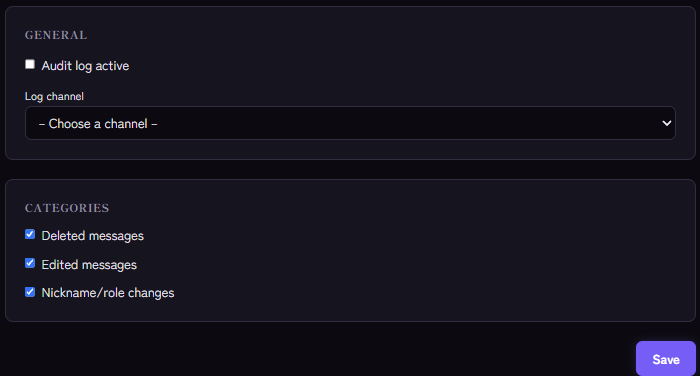
- In the Kage dashboard open the Audit Log module and switch on Audit log active.
- Pick the log channel.
- Under Categories enable the logs you want:
- Deleted messages
- Edited messages
- Nickname/role changes
- Save.
What the log shows
- Deleted message: author, channel and the text of the message.
- Edited message: author, channel and the text before and after. Pure link previews, where the text does not change, trigger nothing.
- Member updated: old and new nickname, plus roles added and removed.
The honest limits
So you can judge the log correctly:
- Only messages Kage has seen. Kage can only log what it holds in its cache. Messages from before a bot restart, or very old messages, do not show up.
- No "who deleted it?" The log names the author of a message but not who deleted it. A moderator who removes a message is not listed.
- Text only. Images and files without text are noted as "no text"; the content itself is not stored. Long texts are shortened (deleted messages to 1000 characters, edited ones to 900).
- No bot messages. Messages from bots are not logged.
- No joins and leaves. This module is not meant for that.
For moderation actions with moderator and reason there is the mod log.
A privacy note
A message log contains content that members actually deleted. Keep the channel strictly private, give it only to moderators, and state in your rules that the server logs edits and deletions.
If it does not work
- Nothing appears. Check that Audit log active is on, a channel is selected, the category is switched on and the bot may write there.
- A particular message is missing. It was probably not in the cache, for example because it was written before the last restart.
- Role changes are missing. The Nickname/role changes category must be switched on.
- No entries for bots. That is intentional.
Works well with
The audit log shows what happened. How to respond is covered by the warning system for individual rule breaks and anti-raid for join waves.
FAQ
Can I log only certain channels?
No. Logging applies to the whole server; you only choose the categories.
Does this replace Discord's audit log?
No, it complements it. Discord's audit log shows administrative actions with the person who did them; the Kage module shows message content.
Related Kage features
- Audit LogIncluded in Basic
- ModerationIncluded in Basic
Related articles
More on this topic: Discord Moderation Guide: How to Keep Your Server Safe
More questions? Ask Kage AIAI
Describe what you need – Kage AI picks out the right guide and gives you the sources.
Try Kage on your server
Sign in with Discord, invite the bot and set up the modules in the dashboard. The Basic plan is free forever.