
How to Set Up a Discord Warning System with Automatic Penalties
Set up a warning system on Discord with a case history, moderator notes and automatic penalties after a number of warnings.
Updated: 14 October 2026
Rules need consequences that are the same for everyone and traceable. With Kage's /mod commands you warn members, see their history at any time and let a penalty kick in automatically after repeated violations.
Quick answer: Warn with/mod warn, set escalation rules under Moderation in the dashboard (for example "at 3 warnings: timeout"), and use/mod historyto see a member's cases.
The commands at a glance
All moderation actions run through the /mod command. They always work, even if you have not configured anything in the dashboard. The settings there only decide whether and where actions are additionally logged and whether to escalate automatically.
/mod warnwarns a member. You give a reason and can optionally add evidence (a link or text). You need the "Timeout Members" permission./mod historyshows a member's full history with case number, type of action, date, reason, evidence and the responsible moderator./mod case-removeremoves a single case by its number, for example a warning issued by mistake./mod note-add,/mod notesand/mod note-removemanage internal notes about a member that only moderators see./mod timeoutand/mod timeout-clearapply and lift a timeout (1 minute to 28 days)./mod kick,/mod ban,/mod softbanand/mod unbanremove or block members. A softban bans and immediately unbans to delete recently sent messages./mod purge,/mod slowmode,/mod lockand/mod unlockclean up channels, slow them down or lock them.
All actions against a member (warning, kick, ban, softban, unban, timeout) end up in their case history. The channel commands /mod purge, /mod slowmode, /mod lock and /mod unlock do not affect individual members and are therefore not listed there. Who can see and use the commands in Discord can be adjusted in your server settings under Integrations.
Setting up automatic escalation
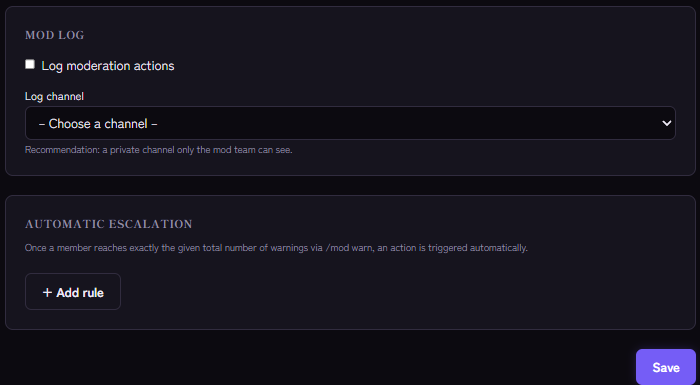
- In the Kage dashboard open the Moderation module.
- In the Automatic escalation section add a rule with + Add rule.
- Enter at how many warnings the rule applies and choose the action: Timeout (with a duration in minutes), Kick or Ban.
- Save.
When a member reaches exactly the set total through /mod warn, Kage runs the action automatically and logs it. The "exactly" is deliberate: it keeps the action from repeating on every further warning.
An example ladder:
- At 3 warnings: 60 minute timeout
- At 5 warnings: kick
- At 7 warnings: ban
You can create up to ten rules, each warning count only once. Only warnings from /mod warn count towards escalation, not kicks, timeouts or bans.
Mod log: make actions visible to the team
In the same module switch on Log moderation actions and choose a Log channel, ideally private for the mod team. More on this: Setting up a mod log channel.
Permissions and role order
Depending on the action the bot needs Kick Members, Ban Members or Timeout Members. Its role must sit above the affected member's role, otherwise Kage does not carry out the action. For an automatic escalation Kage silently skips members with a higher role.
If it does not work
- Escalation does not trigger. Check that the rule has exactly the right warning count, that the member really has that many warnings from
/mod warn(/mod history) and that role order and bot permissions are right. - A case should go. Remove it with
/mod case-remove. The warning count drops accordingly. - No log entry. Log moderation actions must be on and a channel chosen.
Works well with
Warnings address individual members. Automatic protection layers take work off your hands: spam protection, the word filter and anti-raid.
FAQ
Does the member get a message when I warn them?
Kage does not send an automatic direct message when warning. Share the reason yourself if needed, or point to your rules.
Do warnings expire?
No. They stay in the history until you delete them with /mod case-remove.
What is the difference between a note and a warning?
A warning counts towards escalation and appears in the history. A note is just an internal remark for the team and has no consequences.
Related Kage features
- ModerationIncluded in Basic
- Anti-SpamIncluded in Basic
- Word FilterIncluded in Basic
Related articles
More on this topic: Discord Moderation Guide: How to Keep Your Server Safe
More questions? Ask Kage AIAI
Describe what you need – Kage AI picks out the right guide and gives you the sources.
Try Kage on your server
Sign in with Discord, invite the bot and set up the modules in the dashboard. The Basic plan is free forever.