
How to Set Up Discord Achievements for Members
Create your own achievements for messages, levels and invites, grant them manually and reward them with XP.
Updated: 13 October 2026
A badge for 1000 messages, an achievement for level 10 or a title for the event win: with the Achievements module you create your own. Kage unlocks them automatically or you grant them by hand.
Quick answer: In the dashboard open Achievements, switch on Achievements active, click + New achievement, choose name, criterion and threshold and optionally set an XP reward. You grant manual achievements with /achievements grant.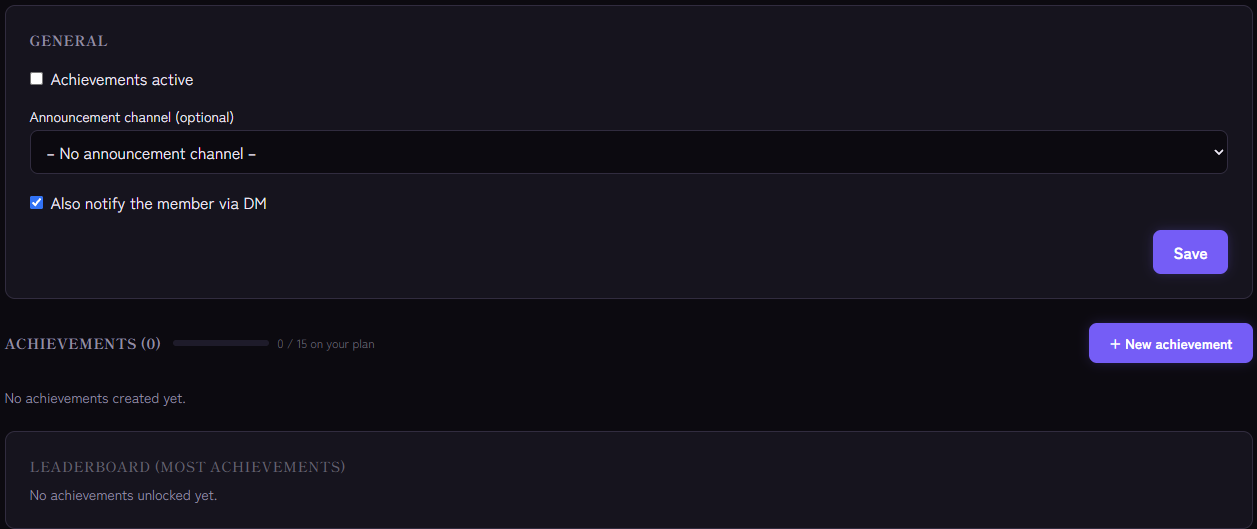
Setting it up
- Open the Achievements module and switch on Achievements active.
- Optional: choose an announcement channel and switch on Also notify the member via DM.
- Click + New achievement and enter:
- Name and Short description (for example "Prolific writer"),
- the criterion and the threshold,
- optionally an XP reward.
- Click Create.
The criteria
- Messages: the member has reached the number of messages. It is checked with every new message.
- Level: the member has reached a certain level. This requires the leveling system. It is also checked when writing.
- Invites: the person has reached the number of invites. It is checked when someone joins through them. The basis is Invite Tracking.
- Manual: there is no automatic check. You grant the achievement yourself, for example for an event win.
Each achievement is unlocked only once per member.
What happens on unlock
- If there is an XP reward, the member gets the XP through the leveling system.
- If an announcement channel is chosen, a message with name, description and reward appears there.- If the DM option is on, the member also gets a private message (provided they allow DMs).
Commands
For everyone: /achievements list (all achievements), /achievements mine (your unlocked ones) and /achievements leaderboard (who has the most). On German clients the group is called /erfolge.
For members with "Manage Server": /achievements create, /achievements grant (grant manually) and /achievements delete.
In the dashboard you also see how often each achievement has been unlocked, and the leaderboard by achievements.
Tips
- Tiers instead of one huge goal: 100, 1000, 10000 messages motivate more often than a single milestone.
- Manual achievements for special things: event winners, helper of the month, veterans.
- Use XP rewards sparingly. Too large bonuses distort level progress.
- Do not confuse with level roles. Achievements unlock nothing but XP and recognition. Roles for levels are covered under level roles.
If it does not work
- No achievement is unlocked. Is the module active, and do criterion and threshold fit? A level achievement needs the leveling system to be active.
- No announcement arrives. Is a channel chosen, and may the bot write and embed links there? Monitoring reports missing permissions.
- The limit is reached. The number of achievements depends on the plan.
- Deleted everything? Deleting an achievement removes all its unlocks. The dashboard asks first.
FAQ
Can I take an achievement back?
There is no command for it. You can delete the achievement, but then all unlocks disappear.
Do old messages count?
Messages that Kage has recorded are counted. Messages written before the bot joined are not included.
Related Kage features
- AchievementsIncluded in Basic
- Levels & XPFrom Premium
Related articles
More on this topic: Discord Economy and Rewards: Motivation for Your Community
More questions? Ask Kage AIAI
Describe what you need – Kage AI picks out the right guide and gives you the sources.
Try Kage on your server
Sign in with Discord, invite the bot and set up the modules in the dashboard. The Basic plan is free forever.