
How to Set Up Kick Live Notifications on Discord
Kage announces on Discord as soon as a Kick channel goes live: enter the channel name, choose target channel and role ping.
Updated: 13 October 2026
You stream on Kick and want your server to know right away? The Kick entry of Social Alerts announces as soon as a Kick channel goes live.
Quick answer: In the dashboard under Social Alerts open Kick, enter the Kick channel name or link, choose an announcement channel and click Add.
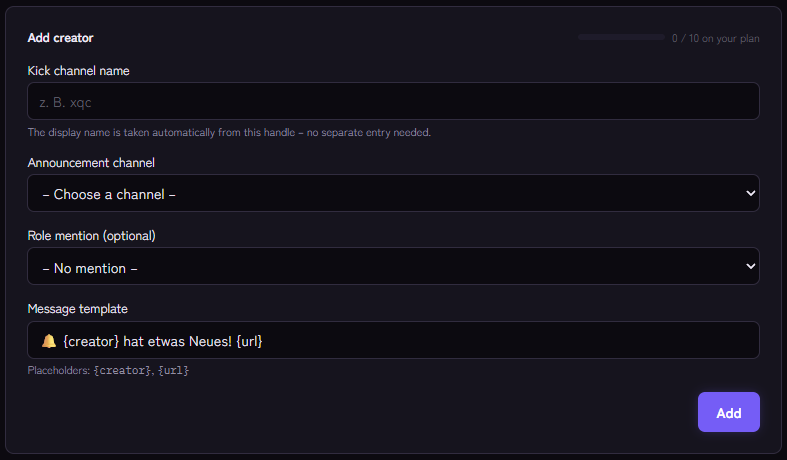
Setting it up
- Open Social Alerts › Kick and use the Add creator form.
- Enter the Kick channel name, for example
mychannel, or the linkkick.com/mychannel. The display name is taken from it. - Choose the channel where it is announced.
- Optional: a role that is pinged with every announcement (otherwise No mention).
- Adjust the message template. Available are
{creator},{title}(the stream title),{url}(link to the channel) and{platform}. - Click Add.
Example template: 🟢 {creator} is live on Kick: {title} {url}
How the announcement behaves
- Kage checks about every five minutes whether the channel is live.
- One stream, one announcement. A new stream from the same channel triggers a new announcement.
- If the channel is already live on the first check after adding it, that stream is only remembered and not announced.
An important note about Kick
Kick does not offer an open interface that can be used without approval. Kage therefore queries the publicly available channel data. If Kick changes that, announcements may stop for a while until the query is adjusted. If announcements stay away although the channel is live, this is a frequent reason.
Automatic stream detection only works for Twitch and YouTube, not for Kick. For Kick you need this entry.
Tips
- A separate channel such as
#live, together with Twitch announcements if you stream on both platforms. - A role for voluntary subscription instead of a constant ping.
- With
/social testan administrator can have all entries checked immediately.
If it does not work
- Nothing arrives. Is the channel name correct (only letters, digits, hyphen and underscore)? Was the entry added only after the stream had started?
- The bot does not post. Check the permissions in the target channel. Monitoring reports missing permissions.
- The limit is reached. The number of entries per platform depends on the plan.
FAQ
Does the streamer have to be on my server?
No, only public channel data is read.
How fast does the message arrive?
With a delay of up to about five minutes.
Related Kage features
- KickFrom Premium
Related articles
More on this topic: Connect Social Media to Discord: Announce New Content
More questions? Ask Kage AIAI
Describe what you need – Kage AI picks out the right guide and gives you the sources.
Try Kage on your server
Sign in with Discord, invite the bot and set up the modules in the dashboard. The Basic plan is free forever.