
How to Make Custom Discord Bot Commands
Create your own commands for rules, links and FAQs without coding: how custom commands work in Kage Bot and what they cannot do.
Updated: 13 October 2026
The same question for the fifth time today? With Custom Commands you create fixed answers that members retrieve themselves. You do not need to write any code.
Quick answer: In the dashboard under Custom Commands create a name and a reply text. Members retrieve it with /command name:<name>.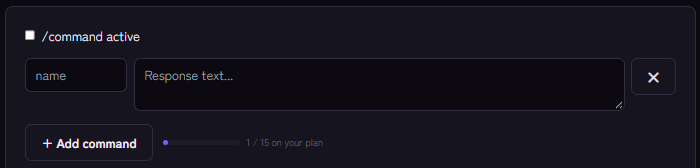
Important up front: one command, many answers
Kage does not register a separate slash command for each custom command. There is a single /command command with a name field and autocomplete that suggests your command names. That keeps the command list clean, but it means: you always call /command and then the name, not /rules or /discord as their own commands.
Setting it up
- Open the Custom Commands module and switch on /command active.
- Click + Add command.
- Give it a name: only lowercase letters, numbers,
-and_, at most 32 characters. - Write the reply text (at most 1900 characters). Discord markdown such as bold works.
- Save. The command is usable immediately.
How many commands you can create depends on your plan; the dashboard shows your limit. The Basic plan limits the number, higher plans do not.
Good ideas
- FAQ:
/command name:vpnexplains how to connect to the server VPN. - Links: game status, wiki, donation page.
- Rules: one command per rule area (for the complete rules see Server rules).
- Help for newcomers: a
startcommand with the most important channels.
What custom commands cannot do
- They answer with text. No images, buttons or formatting like embeds; for those use the embed builder.
- They are not dynamic: there are no variables and no conditions. Automations handle that.
- The answer is visible to everyone, not private.
If it does not work
- "Command not found". Check the name (case is not required to match, but it must exist) and that the module is active.
- The command does not show in the list. It can take a few minutes for Discord to show new commands; restart the client.
- Limit reached. The number depends on your plan.
FAQ
Can I create commands with a prefix like !rules?
No, only through /command.
How many commands can I create?
That depends on the plan and is shown in the dashboard.
Related Kage features
- Custom CommandsIncluded in Basic
Related articles
More on this topic: Discord Automation: How to Automate Server Management
More questions? Ask Kage AIAI
Describe what you need – Kage AI picks out the right guide and gives you the sources.
Try Kage on your server
Sign in with Discord, invite the bot and set up the modules in the dashboard. The Basic plan is free forever.