
How to Schedule Messages in Discord
Send messages on a schedule or at fixed intervals: set up recurring and timed messages in Discord.
Updated: 13 October 2026
A weekly overview on Monday, an event reminder on Friday, a notice every six hours: with Auto Messages Kage posts recurring messages without your involvement. Discord itself cannot repeat messages on a schedule.
Quick answer: In the dashboard under Auto Messages create a message, choose the channel and text and decide: Interval ("every N minutes") or Schedule (weekdays and time with time zone).
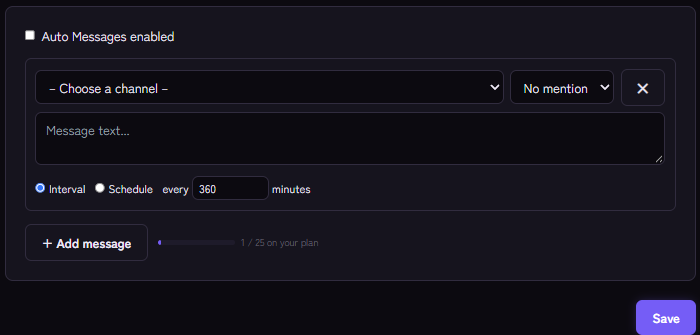
Setting it up
- Open the Auto Messages module and switch on Auto Messages enabled.
- Click + Add message and choose the channel.
- Write the message text.
- Choose the mode:
- Interval: "every … minutes", for example every 360 minutes for every six hours.
- Schedule: choose the weekdays (Mon to Sun), the time and the time zone as an IANA name, such as Europe/Berlin.
- Optionally mention a role with every message.
- Save.
Up to 25 messages per server are possible, depending on the plan.
Interval or schedule?
- Interval suits notices that should be visible regularly ("remember the rules").
- Schedule suits appointments ("every Monday at 18:00"). With schedules the time zone matters, otherwise the message arrives at the wrong hour.
Tips
- Not too often. Frequent intervals are annoying. A notice every six hours is rarely needed.
- Use role mentions sparingly. Whoever is pinged every week eventually tunes out.
- Nicer design: For embeds with images and buttons use the embed builder and automation rules.
- Stay at the bottom instead of repeating: For a permanent notice sticky messages are better.
If it does not work
- Nothing is posted. Is Auto Messages enabled on, is the message active and may the bot write in the channel?
- Wrong time. Check the time zone and the weekdays.
- The module is resting. Auto Messages are tied to a plan.
FAQ
Can I schedule a single message for later?
Auto Messages are meant for recurring messages. You send a one-off announcement immediately under Announcements in the dashboard; delayed sending is not offered there.
Does the schedule keep running after a restart?
Yes, the configuration is stored.
Related Kage features
- Auto MessagesFrom Premium
- Embed BuilderFrom Premium
Related articles
More on this topic: Discord Automation: How to Automate Server Management
More questions? Ask Kage AIAI
Describe what you need – Kage AI picks out the right guide and gives you the sources.
Try Kage on your server
Sign in with Discord, invite the bot and set up the modules in the dashboard. The Basic plan is free forever.