
All-in-one for Discord communities
Make Discord smarter
with Kage Bot.
Moderation, welcome messages, tickets, levels, automations and AI in one bot – set up in minutes in a web dashboard. Many modules are free for good, you unlock more one by one. No plans, no subscription.
Ask Kage AI – the AI for your Discord server
Say what you want to achieve on your server – Kage AI answers from the Kage guides, gives you the sources and guides you step by step. Included for server owners with Kage.
Let the AI set up your server
Describe what your server should look like. Kage AI drafts roles, channels, permissions and the matching modules. You see everything in a preview before anything is created.
Start with the AI9 servers set up
- Preview before every changeRoles, channels, permissions and design can be adjusted beforehand.
- Pre-check with helpKage checks that everything will work and explains the fix step by step if something is wrong.
- Everything can be undoneWith one click Kage removes what the AI created.
Simulation
How a template turns into your Discord server
This is the real template “Gaming – Roleplay” in action: picked, checked and then created step by step – with roles, permissions, channels and modules.
Gaming – Guild & Clan
For guilds, clans and raid groups: applications, raid and event planning with tank, healer and DPS roles, group finder, voice channels per group and a private officers area. Design: double frames around the categories, weapons and shields in front of the channels.
Gaming – Roleplay (RP)
For roleplay servers (for example GTA RP): whitelist application, separate OOC and IC areas, factions with private channels, radio voice channels, marketplace and a clearly separated staff area. Design: city look with brackets around the categories and the emoji in brackets in front of every channel.
Relax & Cozy
A calm, cozy corner to chat: coffee talk, creative corners, cozy games, a small well-being area and a lounge to talk or relax together. Design: soft dots around the categories, an emoji in front of and a little flower behind every channel.
Meet & Chill
To meet people and hang out: open chats, interest areas, game nights, plenty of voice channels (also self-made ones), events and polls. Design: emojis left and right of the categories, a dotted line between the emoji and the channel name.
Business & Team
For companies, teams and customer communities: announcements, projects and tasks, customer support with tickets, a private internal area and meeting rooms. Design: clean and businesslike – a bar in front of every category, a wide line after the symbol.
Community (All-rounder)
A solid base for almost any community, creator or fan server: welcome, chats, topic areas, events and giveaways, voice channels and a clean team with support. Design: a ribbon with a diamond in front of every category, an arrow after the emoji.
Selected template
Gaming – Guild & Clan
For guilds, clans and raid groups: applications, raid and event planning with tank, healer and DPS roles, group finder, voice channels per group and a private officers area. Design: double frames around the categories, weapons and shields in front of the channels.
You can adjust roles, channels, design and modules before anything is created. Nothing is created without your confirmation.
Example with a made-up server name. Roles, permissions, channels and modules come from the real template; you adjust names and colours during setup. Module prices are shown in the cart.
How an event runs with the Gaming Webapp
Create the event, assign groups, customise the webapp, and the roster lands as a post in Discord. All names and numbers are examples.
New event
✓Auto-assign when signup closes
Create event
Groups · 30 slots
You define roles, groups and sides per format yourself.
Your events · as many formats as you like
Do you build a game? Bring it to Kage and give your community a server template.
Apply as a developer, verify your game and publish a checked template with a blue badge. Taking part is voluntary.
- Easy to joinYou add your game and publish a template. Taking part is voluntary.
- Blue badgeYour template is marked as confirmed by the developer.
- Your game, your rulesChannels, roles and modules the way your game needs them.
Welcome
New members feel at home right away
A welcome with banner, automatic roles and rules to accept: every newcomer lands in the right place and knows what to do.
- Welcome and goodbye messages with your own banner
- Auto roles, verification and minimum age
- Everything set up in the dashboard, no commands needed
Protection
Safe before anything happens
The protection modules work together: from verification at join to everyday moderation, with a history for your team.
Activity
Members earn levels and rank up
Messages, reactions and voice time earn experience. Five ranks with Discord roles, leaderboards and rewards keep your community moving.
- Rank roles are assigned automatically
- Protection against farming: limits and cooldowns
- Multipliers for events and boosts
Support
Tickets that really take work off your team
Members open a ticket with one click, your team takes over, escalates and closes it. With notes, priorities and a rating afterwards.
- Priority, notes and claiming by your team
- The history is saved as a transcript
- Response times analysed in the Control Center
A lot included, fairly priced
One bot instead of many single ones – and you only pay when you need more.
Free
17 modulesModeration, welcome, auto roles, polls, Anime RPG and more: free for good.
Add one by one
from €0.50 a monthLevels, economy, tickets, automations, analytics and more: you only pay for the modules you use. Test each one free for 7 days.
Discounts and gifts
up to 50 %Longer terms and more modules get cheaper, and from a certain order value there are gifts. You see it all in the cart before you pay.
Prices apply per server. See all prices
How it works
Sign in with Discord
One click, the same Discord login as everywhere else – we only see your name and which servers you have "Manage Server" on.
Choose a server
Already got the bot there? Set it up right away. Not yet? One click invites it – the same page shows the dashboard right after.
Set up modules
Welcome, moderation, tickets, rank system and more – every module toggled individually, effective immediately.
💎 Gaming webapp
For guilds with their own game: a webapp that adapts to you
Event and roster planning with a genuinely own look: your own logo, header banner, colors, and freely definable formats, roles and classes – whether it's a fantasy raid, a space fleet, or a tactical shooter. Reachable directly from every server's dashboard, included in the Enterprise plan.
- Your own branding — logo, banner & colors per guild
- For any game — your own formats, roles & classes
- Automatic event & roster assignment, no spreadsheets
- Works directly with the bot — the webapp automatically posts event announcements, group line-ups and reminders to your Discord channels
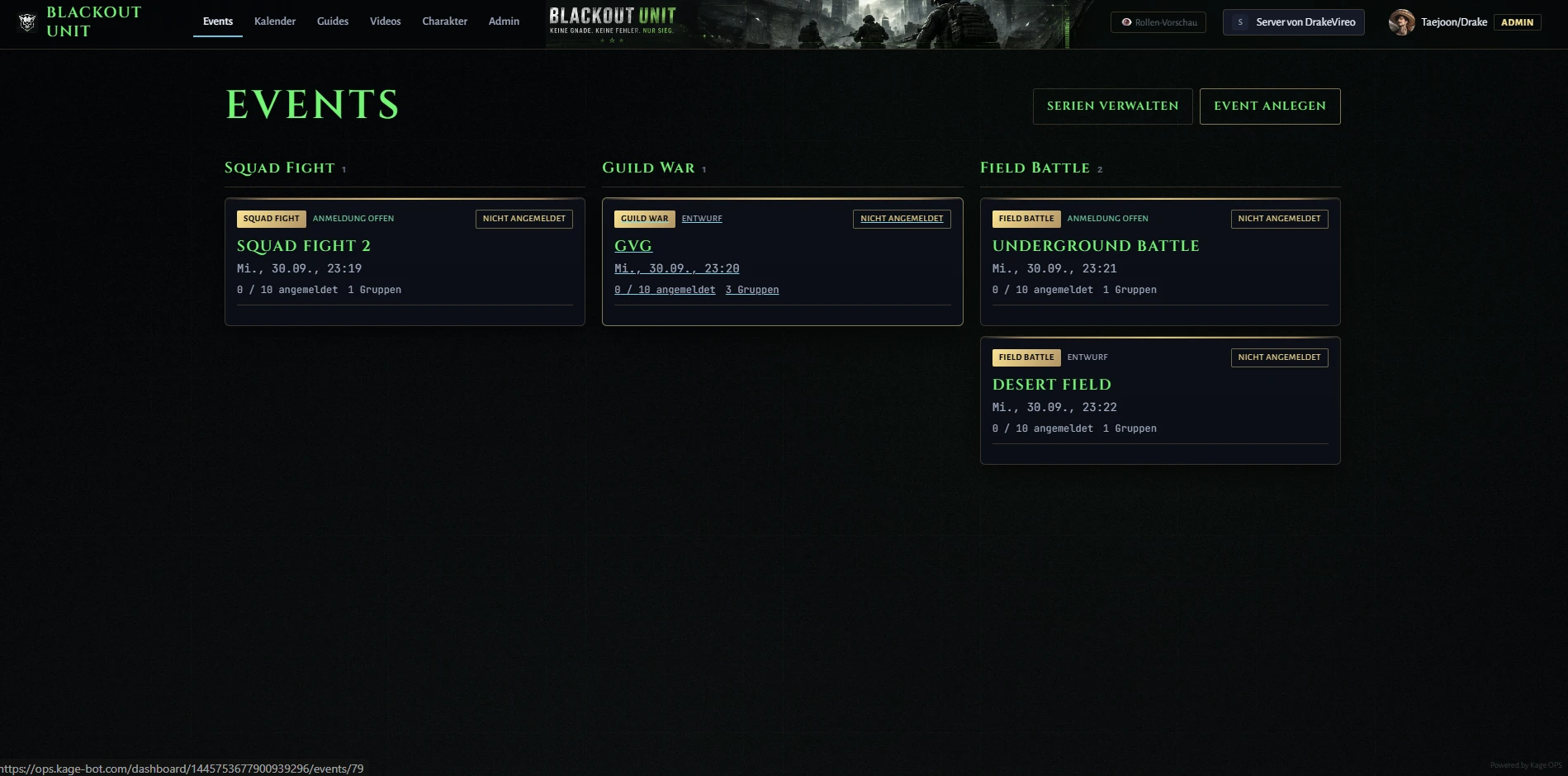
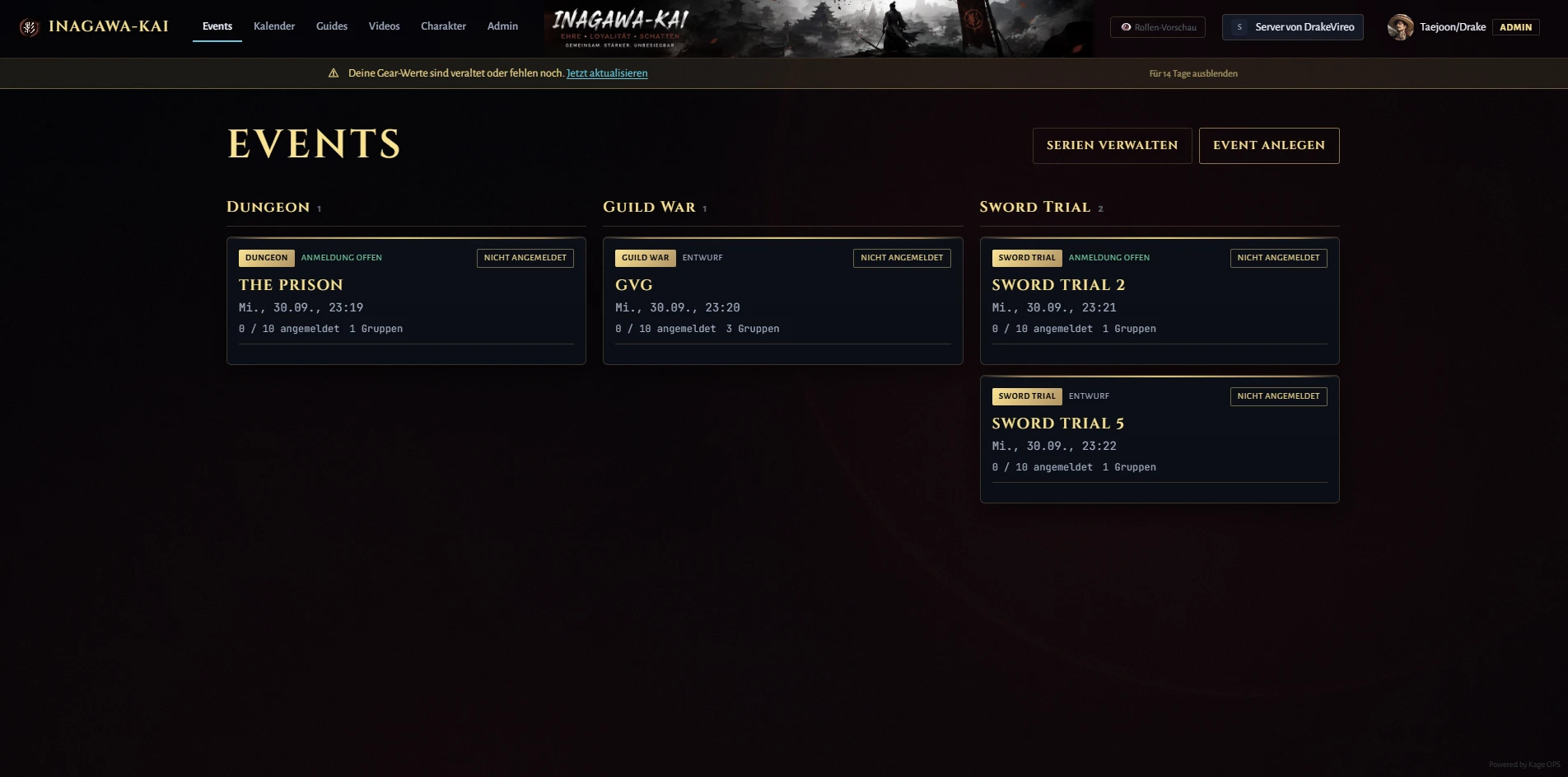
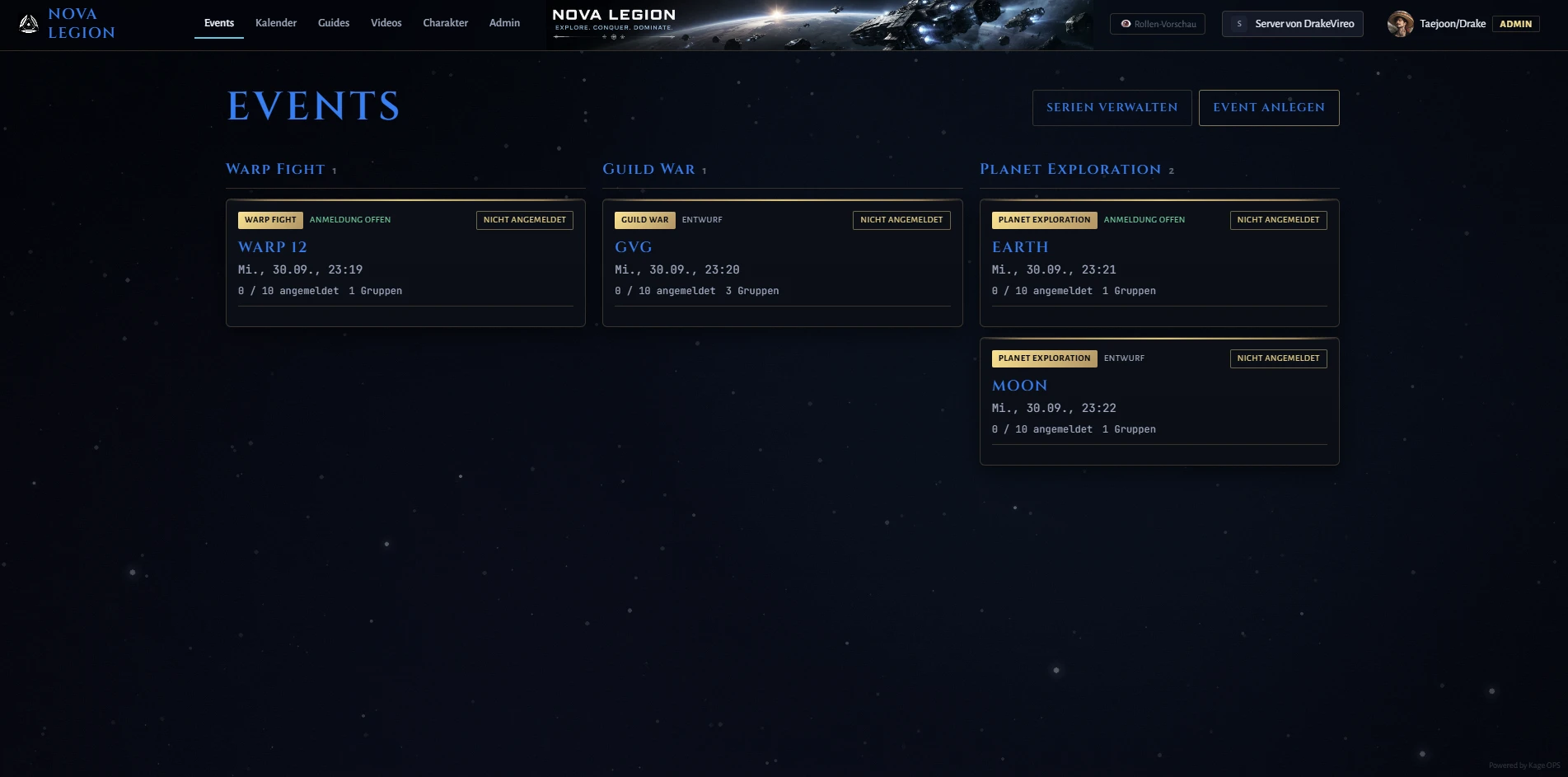
Blackout Unit — tactical shooter look with its own banner & colors
Desktop app for Windows
Kage Control Center: your server at a glance
The dashboard configures, the Control Center shows what is happening on your server and lets your team act: server health, analytics, security, support tickets and notifications right on the desktop.
See prices and features- Server healthAn explainable score shows how healthy your community is.
- Support teamHandle and escalate tickets and keep an eye on response times.
- ApplicationsYour team accepts applications, and the admin sees who decided what.
- NotificationsImportant events show up right on your desktop.
What the bot brings
61 modules – each toggled on or off individually.
Popular guides
Explained step by step, with and without a bot. Every guide shows how it works in Discord and how Kage takes it off your hands.
- Create a poll in DiscordWith /poll, in the dashboard or recurring
- Create reaction rolesHand out roles by emoji or button
- Assign roles automaticallyStarter role on join and more
- Birthdays and greetingsAdd a birthday, congratulate automatically
- Schedule messagesRecurring and timed messages
- Set up a leveling systemXP, ranks and rewards
- Create embed messagesColors, images and buttons
- Set up your server with AIKage AI proposes channels, roles and modules
Ready to get started?
Sign in, pick your server, set up what you need.
Sign in with Discord